
iPhone Repair Service Centre Delhi NCR
(By Kushwaha Telecom Pvt. Ltd.)
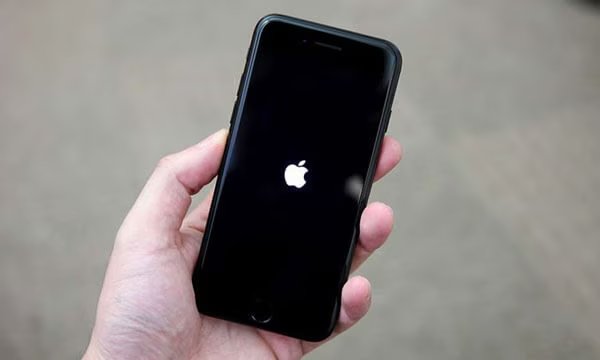
If you’re looking for a trusted iPhone repair service center in Delhi NCR because your iPhone is stuck on the Apple logo, don’t worry this issue is far more common than users think. It can occur on any generation device including the latest iPhone 17 Pro Max, iPhone 17, iPhone 16 lineup, iPhone 15 series, iPhone 14, iPhone 13, iPhone 12, iPhone 11, XR, XS, and earlier models. Whether your iPhone freezes during startup or keeps restarting in a boot loop, it doesn’t automatically mean your phone is permanently damaged.
Many users panic because the screen becomes unresponsive and sensitive information like photos, data, passwords, WhatsApp messages, banking apps, and office documents appear lost. But in most cases, the issue is fixable. With the right diagnostic approach, the majority of stuck devices can be restored without data loss.
At Kushwaha Telecom Pvt. Ltd., a leading Apple Service Centre, iPhone Repair Centre, and Apple Repair Specialist in Delhi NCR, we fix this issue daily using advanced tools, certified repair methods, and board-level expertise.
Why Does an iPhone Get Stuck on the Apple Logo?
Understanding the root cause helps ensure faster and safer recovery. Some of the most common reasons include:
1. Interrupted Software Update
When an update is interrupted due to low battery, unstable Wi-Fi, or forced shutdown, your iPhone may fail to load the operating system fully.
2. Storage Overload
If your iPhone has 0-1% free storage, the device may freeze during boot because the system cannot configure essential files.
3. Corrupted iOS Files
Improper jailbreak attempts, failed backups, malware, or corrupted firmware can lead to continuous restart loops.
4. Hardware or Logic Board Issues
Damaged ICs – especially NAND, CPU, PMIC, or storage chips are common causes of devices being stuck at the Apple logo.
5. Battery or Power IC Failure
If power delivery is unstable, the iPhone may start booting but fail midway, leading to a freeze on the logo screen.
What You Should Try Before Visiting a Service Center
⚠️ Avoid random YouTube hacks many cause data loss or damage.
Here are safe steps you can try:
1. Restart
Press and release Volume Up, then Volume Down, then hold the Side/Power button until it restarts.
2. Connect to Power
Sometimes the device doesn’t have enough charge to complete booting.
3. Update via iTunes/Finder
Connecting your device to a Mac or PC and running a software update may fix corrupted firmware.
If these steps fail or if the device keeps restarting, professional repair is required.
How Professional Repair Helps
At Kushwaha Telecom Pvt. Ltd., we follow a structured diagnostic and repair process:
1. Diagnosis and System Scan
We check NAND storage, motherboard condition, battery health, update logs, and boot files.
2. Software Repair or Restore
Using official tools, we attempt a restore/update without wiping your data.
3. Hardware Testing
If software isn’t the cause, we inspect connectors, ICs, memory, and power distribution pathways.
4. Chip-Level Repair (If Needed)
For severe corruption or hardware shortages, our certified engineers perform logic-board repair, micro-soldering, and IC replacement.
5, Final Testing & Warranty
Once repaired, your device undergoes heat testing, battery evaluation, and functional quality checks.
What About Data Recovery?
Data recovery is a major concern for users. Depending on the root cause, we prioritize data-safe repair before attempting system rewrite. In many cases, device repair restores:
Photos
WhatsApp & iMessage chats
Notes, contacts, documents
Passwords and saved apps
If the memory storage chip is affected, we also provide advanced NAND-level recovery solutions.
Other Repair Services Available
While iPhone boot loop and Apple logo freeze are common issues, many customers also require related services such as:
iPhone Broken Screen Repair
iPhone Battery Replacement
Charging Port Repair
Back Glass Replacement
Camera and Face ID Repair
Water Damage Recovery
We also offer professional repairs for:
MacBook Repair (screen, battery, keyboard, motherboard)
iPad Repair (display, battery, software, charging issues)
Apple Watch Repair (display, battery, software reset)
So whether it’s your iPhone, MacBook, iPad, or Apple Watch, we provide end-to-end repair solutions with quality parts and transparent pricing.
Why Choose Kushwaha Telecom Pvt. Ltd.?
Choosing the right repair partner makes a difference in performance, data safety, and repair success. With skilled technicians, advanced diagnostic equipment, OEM-grade parts, warranty support, transparent costing, and years of trusted expertise, we are recognized as one of the most reliable Apple Service Centres in Delhi NCR.
We also offer pickup and delivery, ensuring a convenient repair experience for every customer.
How to Get Your Device Repaired
Booking is simple:
Visit: https://kushwahatelecom.com/
Choose your device (iPhone, iPad, MacBook, Apple Watch)
Submit your repair request
Our team will assist you with next-step guidance
You can also call us for quick support.
FAQs
Can an iPhone stuck on the Apple logo be repaired without losing data?
Yes, depending on the cause. Most devices are repairable without data wipe if diagnosed early.
How long does this repair take?
Basic software fixes may take 30 minutes to 2 hours. Logic-board repairs may require more time.
Do you repair the latest iPhone models like iPhone 17 series?
Yes, we repair all latest and previous generations.
Is motherboard repair available?
Yes, we specialize in chip-level and logic-board repair.
Do repairs come with a warranty?
Yes, all services include warranty depending on the part and repair type.
Can water-damaged phones also get stuck on the Apple logo?
Yes, water damage often affects motherboard chips, causing startup failure.
Do you also repair MacBooks, iPads, and Apple Watches?
Absolutely, we provide complete repair support for all Apple devices.
