
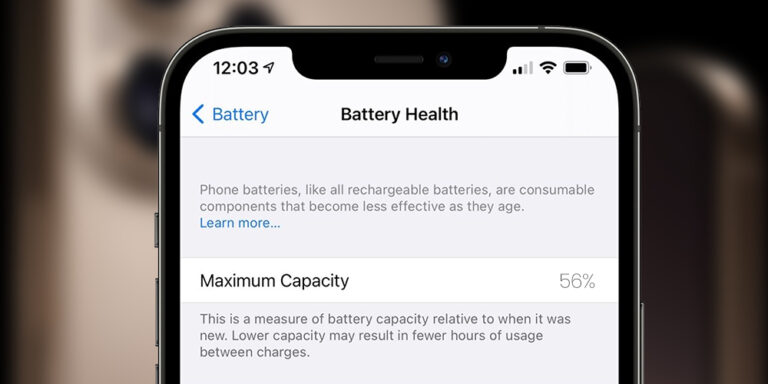
Your iPhone’s battery plays a critical role in how efficiently your device performs throughout the day. From business calls and online payments to navigation, social media, and entertainment, nearly every function depends on stable battery power. Over time, however, battery performance naturally declines, leading to reduced backup, slower performance, and unexpected shutdowns.
Apple makes it easy to monitor battery condition under Settings > Battery > Battery Health & Charging, where you can check your battery’s maximum capacity and performance status. But many users still wonder: When exactly should I replace my iPhone battery? This guide explains battery health levels, common warning signs, and practical tips to help you make the right decision.
Understanding iPhone Battery Health
iPhones use lithium-ion batteries designed to deliver fast charging and long-lasting performance. However, like all rechargeable batteries, they degrade over time due to chemical aging and repeated charging cycles. Battery health is shown as a percentage that represents how much charge your battery can hold compared to when it was new.
A new battery starts at 100% capacity. As the battery ages, this percentage slowly decreases, meaning your phone can no longer hold the same amount of charge. While gradual decline is normal, faster drops in battery health often result in noticeable performance issues such as shorter screen-on time, heating, or lag during heavy usage.
Monitoring battery health regularly helps you detect early signs of degradation and plan timely replacement before performance becomes unreliable.
What Battery Health Levels Mean
90% and Above
Your battery is in excellent condition. You can expect normal backup, stable performance, and smooth daily usage. Replacement is not required at this stage.
80% – 89%
Battery capacity has slightly reduced, but performance remains acceptable for most users. You may notice a small drop in backup time, especially during heavy app usage, but replacement is not urgent.
Below 80%
This is the most important threshold. At this level, battery degradation becomes noticeable. Your iPhone may drain faster, heat more often, or experience performance management by iOS to prevent sudden shutdowns. Battery replacement is recommended for reliable daily performance.
Below 70%
The battery is significantly worn. You may need to charge multiple times a day, experience frequent slowdowns, and notice unstable performance. Replacement becomes strongly advisable.
Below 60%
The battery is severely degraded and struggles to hold charge. Random shutdowns, very short backup, and poor performance are common. At this stage, replacing the battery is essential to restore usability.
Signs Your iPhone Battery Needs Replacement
Battery health percentage is not the only indicator. Some symptoms clearly signal battery failure, including rapid battery drain even after full charge, sudden shutdowns during calls or app usage, slow charging or overheating, and noticeable performance lag. You may also see a battery service warning in your iPhone settings, which means the battery can no longer deliver peak performance reliably.
If these issues affect your daily routine, visiting a professional iPhone service centre for battery inspection is the best next step.
Why Timely Battery Replacement Matters
Delaying battery replacement can affect more than just backup time. A degraded battery struggles to deliver stable power, which can lead to performance throttling, app crashes, camera delays, and even unexpected shutdowns during important tasks. Over time, excessive heat and unstable voltage can also impact internal components.
Replacing the battery at the right time restores smooth performance, improves device stability, and extends your iPhone’s usable life, making it a more cost-effective option than upgrading your device prematurely.
Tips to Maintain iPhone Battery Health
Good charging habits can significantly slow battery degradation. Avoid frequent full discharges and try to keep your charge level between 20% and 80% whenever possible. Enable Apple’s Optimized Battery Charging feature, which learns your charging routine and reduces battery aging. Protect your iPhone from high temperatures, as heat accelerates battery wear. Always use certified charging accessories, and keep your iOS updated to benefit from system-level battery optimizations. When needed, Low Power Mode can help extend usage during busy days.
Conclusion
In most cases, when your iPhone battery health drops below 80%, replacement becomes the best option to restore reliable performance and backup. Below 70% usually indicates that the battery has reached the end of its usable life. Monitoring battery health regularly allows you to avoid sudden shutdowns and maintain consistent device performance.
If your iPhone is showing battery-related issues, Kushwaha Telecom Pvt. Ltd., an experienced iPhone service centre in Delhi NCR, can help diagnose your device and guide you with the right solution.
FAQs
How long does an iPhone battery usually last?
Most iPhone batteries last around 2 to 3 years depending on usage habits, charging patterns, and environmental conditions.
Can I continue using my iPhone if battery health is below 80%?
Yes, but you may experience reduced backup, slower performance, and occasional shutdowns. Replacement is recommended for reliable daily use.
Does replacing the battery erase my data?
No, battery replacement does not affect your data. However, backing up your device before service is always advised.
Will battery replacement improve iPhone performance?
Yes, a new battery often restores better backup, smoother app performance, and more stable system behavior.
Why does my iPhone shut down even when battery percentage is high?
This happens when a degraded battery cannot deliver peak power during heavy usage, causing sudden shutdowns.
Can overheating damage iPhone battery health?
Yes, prolonged exposure to heat significantly reduces battery lifespan and overall performance.
How can I check my iPhone battery health?
Go to Settings > Battery > Battery Health & Charging to view your battery’s maximum capacity and performance status.
Where can I replace my iPhone battery safely?
You can visit Kushwaha Telecom Pvt. Ltd., a professional iPhone service centre in Delhi NCR for proper diagnosis and battery replacement.
